📘 Accessing the System
Access the Portal
If you are reading this page, Step 1 is completed.
Open a modern browser (Google Chrome, Mozilla Firefox, or Microsoft Edge) and go to: academics.nuutvc.ac.ke
Login to Your Account
Click the Login button on the top-right corner of the homepage.
Enter Your Credentials
Use your Email Address and the default password: 1234567890. Make sure your email is active and accessible.
Change Your Password
Change the default password immediately after first login. Password requirements:
- At least 8 characters long
- Contains uppercase & lowercase letters
- Includes at least one number and one special character
Tip: Choose a password memorable to you but difficult for others to guess.
Document Management
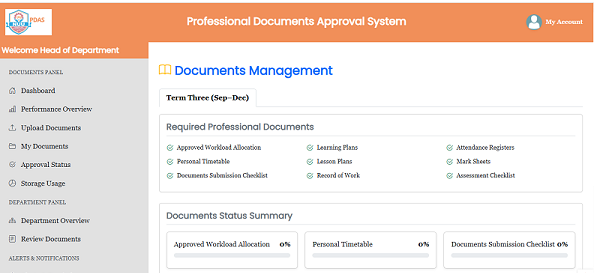
The dashboard has these main menu options:
- My Dashboard: Overview of submitted documents and performance highlights.
- Overall Performance: Comparative analysis across terms.
Document Management
The dashboard has these main menu options:
- Upload Documents: Upload your PDF files. Ensure Learning Plan Hours are accurate, as the system uses them for performance metrics. Other file formats will not be processed.
Document Management
- My Documents: Lists uploaded documents by term and subject.
- Approval Status: Shows document status:
- ✅ Approved by HoD or Deputy
- ⏳ Pending review
- ❌ Rejected with comments for correction
Logout Safely
Click Logout when finished to protect your account from unauthorized access.
📝 Document Approval Process
1. HOD Review
Once documents are uploaded, Heads of Department can see and approve or reject them.
2. Amending Rejected Documents
If a document is rejected, it must be amended and re-uploaded for approval.
3. Deputy Principal Academics Review
Approved documents from HOD appear on the Deputy Principal Academics dashboard for final approval or rejection.
4. Rejection by Deputy
If the Deputy Principal Academics rejects a document previously approved by the HOD, the approval process starts again.
5. Final Approval
Once approved by the Deputy Principal Academics, the document’s approval is complete and cannot be amended.
6. Future Document Approvals
Subsequent document approvals will be incorporated in the system soon.
7. Stamped Documents
Approved/rejected documents will be stamped and visible in My Documents. Fully approved documents can be downloaded for backup.